Image Search Techniques: A Practical Guide to Finding and Verifying Images

Want to know about the real owner of the image? Various modern image search techniques can identify objects, locate copies of a photo, find exact text, find higher-quality versions, etc. Try Google Lens it can solve 70% of your problems.
Or you can try different methods some rely on normal keywords. Others use computer vision, reverse image search, OCR, image fingerprints, and AI. The right technique depends on your use case.
You may want to find the source of a photograph. You may have a screenshot with text but no source link. Or you may want to know what product, building, logo, painting, or object appears in an image. Each case needs a slightly different search method.
In this guide, you’ll learn methods, the best tools to use, and practical ways to improve your results..
What Are Image Search Techniques?
Image search techniques are methods used to locate images or information connected to them. Traditional image search starts with words. You enter a phrase such as “red vintage Porsche in London,” and the search engine returns pictures that match those terms.
Visual search works differently. Instead of describing an image, you give the search engine the actual picture. The system analyzes visual features and compares them with other images or information in its index.
Modern search engines can examine shapes, colors, objects, text, products, landmarks, and other visual details. Some services focus on finding exact copies. Others are designed to understand what an image contains.
That difference matters. A tool that is excellent at identifying a product may not be the best tool for tracing the first known copy of a photograph.
What Is Reverse Image Search?
Reverse image search means searching with an image instead of starting with words.
You upload a photograph, paste its URL, or provide the image in another supported way. The search engine then looks for matching or visually related images.
Google, for example, lets users upload an image, drag an image into its search interface, paste an image link, or search directly from a webpage. Google Lens results can include similar images, information about objects, and websites containing the same or a similar picture.
This technique can help you discover where a picture has appeared online. It can also reveal different sizes, crops, edited copies, or pages discussing the same subject.
Reverse searching is especially useful when you have the picture but lack useful information about it.
How Does Reverse Image Search Work?
A reverse search engine does not simply read an image’s filename.
Systems can analyze visual characteristics such as shapes, edges, patterns, colors, textures, and relationships between objects. Different search providers use different recognition models and indexes.
TinEye offers a useful example. It creates a compact digital fingerprint from an uploaded image and compares that fingerprint with images stored in its search index. TinEye says it does not depend on filenames or image metadata for this matching process.
This approach also explains why an altered picture may still produce results.
A photo can be resized, compressed, lightly edited, or cropped while retaining enough visual information for a search system to recognize it. TinEye specifically focuses on matching copies and altered versions rather than simply returning unrelated photographs of the same subject.
Other systems take a broader approach. Google Lens and Bing Visual Search can use image understanding to return related objects, products, webpages, and visually similar content.
The Best Way to Do an Image Search
The strongest method is usually not to search an image once. Use several approaches and compare the results.
Start with the clearest available version of the picture. Search the complete image first because backgrounds, signs, buildings, logos, and other details may provide useful clues.
Then create a second version focused on the most important area. If you want information about a chair in a room, for example, crop the picture around the chair. If you need to trace a photograph, also search the uncropped version.
Cropping can dramatically change visual search results. A search engine presented with an entire street scene may focus on the buildings. Cropping one vehicle from that scene tells the system that the vehicle is probably your main subject.
Run the image through more than one search engine when accuracy matters. Different companies maintain different indexes and use different recognition systems. A picture that produces no useful result in one service may work well in another.
Finally, inspect the webpages containing matching images. The search result itself is only a clue. The webpage, publication date, caption, author, and surrounding text often provide the information needed to understand the image.
Top Tools for Effective Image Searching
Different tools perform different jobs. There is no single search engine that wins every type of search.
| Tool | Best Use | What It Can Help Find |
| Google Lens | General visual search | Similar images, objects, products, webpages and visual information |
| Bing Visual Search | General alternative | Related images, products, webpages and objects |
| TinEye | Exact and modified matches | Reposts, edited versions, older indexed copies and higher resolution versions |
| Google OCR and Lens | Text inside images | Names, signs, labels, addresses and document text |
| ChatGPT with image input | Image understanding | Objects, context, text, documents and clues that can become better search queries |
Google Lens

Google Lens is one of the most flexible options because it combines image recognition with Google’s broader search system.
Google says Lens can return information about objects in an image, similar pictures, and websites containing the same or similar image. Users can also add words to a visual search after uploading the picture.
That last feature is particularly useful.
Suppose you upload a picture of an unknown shoe. A visual search may produce hundreds of shoes. Adding words such as “men’s,” “2019,” “Nike,” or a visible model number can narrow the search dramatically.
Bing Visual Search
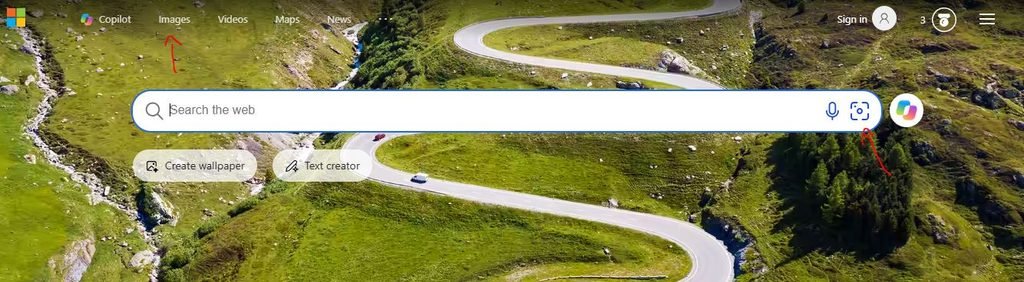
Bing Visual Search is worth checking when Google produces weak results.
Microsoft says Bing can search the web using an uploaded image and return pages using that image, related pictures, products, and other information. Desktop users can upload, drag, paste, or provide an image URL.
Using a second search engine matters because its index may contain pages that another engine has not ranked prominently.
TinEye
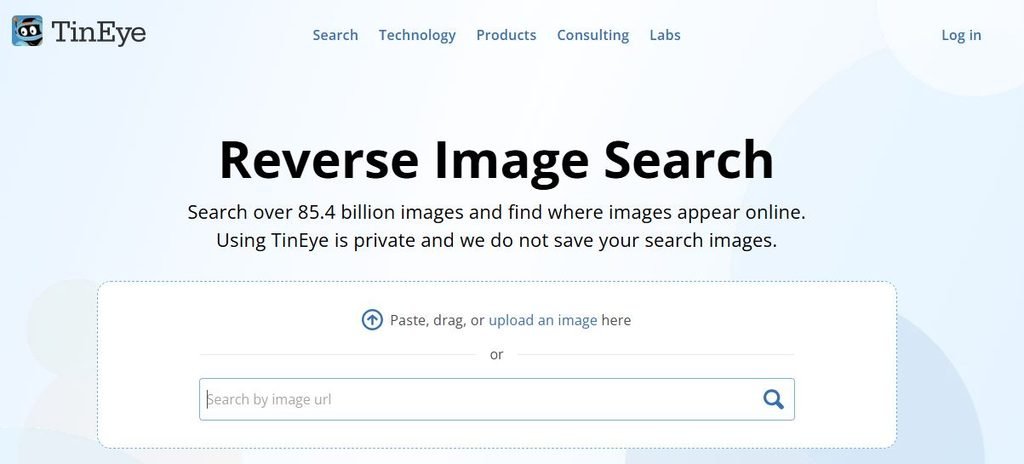
TinEye is particularly useful when your main question is:
“Where else has this exact picture appeared?”
Rather than concentrating mainly on general visual similarity, TinEye searches for matching versions of an image. It can recognize versions that have been cropped, resized, or edited.
Its sorting options also help with research. TinEye lets users sort matches using options including Best Match, Most Changed, Biggest Image, Newest, and Oldest.
However, an important distinction applies to its dates.
TinEye’s “first found” date means the date its crawler first discovered that image. It does not prove that this was the first time the image appeared anywhere on the internet.
That distinction is important when verifying viral photographs or historical claims.
Is There a Better Image Search Than Google?
There is no universal search engine that is better than Google for every image.
Google Lens is strong when you want broad information about what appears in a picture. It can connect an image with webpages, similar images, products, objects, and other search information.
TinEye may be more useful when you are looking specifically for copies or modified versions of the same picture. It can also help when you want to compare older indexed appearances or locate a larger version.
Bing Visual Search makes a useful second check because it searches Microsoft’s own web index and can return both related images and webpages containing the picture.
So the better question is not “Which image search engine is best?”
Ask:
“What am I trying to find?”
Use Google Lens for broad visual understanding, TinEye for matching copies, and Bing when you want another independent set of results.
Using OCR to Improve Image Searches
OCR, or Optical Character Recognition, converts visible text inside an image into searchable text.
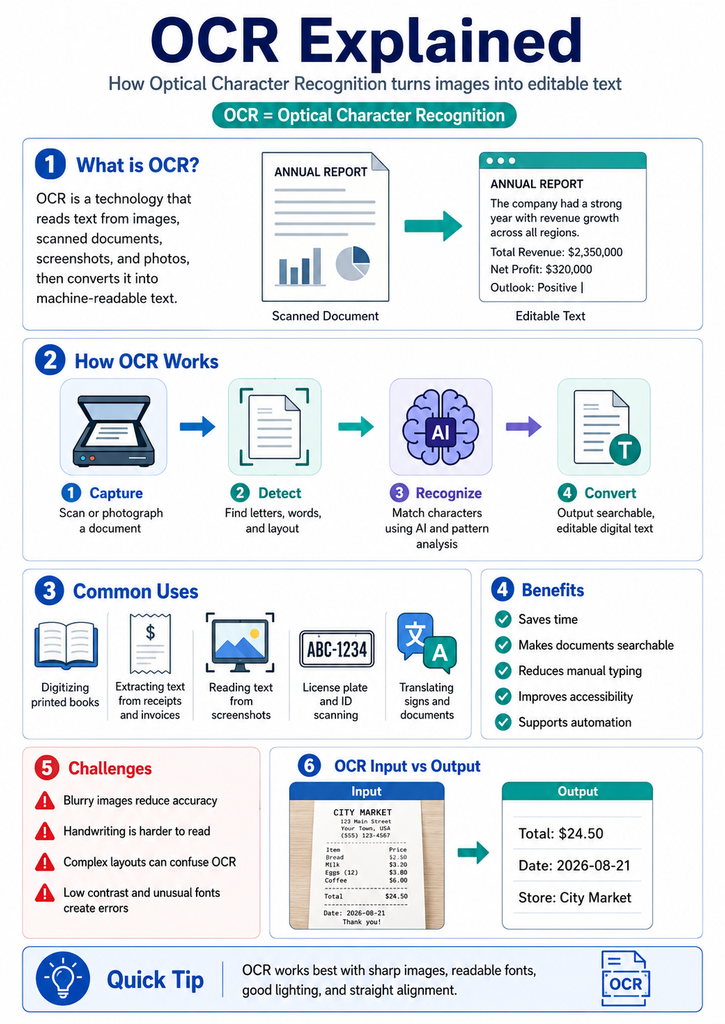
It is one of the most useful image investigation techniques because written words can reveal much more than visual similarity alone.
Imagine you have a screenshot showing an unknown restaurant. Reverse image search produces nothing useful. But the photograph contains a partly visible phone number, street sign, menu item, or business name.
OCR can extract that information.
You can then put the extracted phrase into a normal search engine. A distinctive sentence, username, product number, company name, address, or phone number can turn an unsuccessful image search into a strong text search.
Google’s visual tools support working with text found inside images. Google Photos documentation, for example, explains that Lens can identify information in photographs and lets users select and copy visible words.
Google Translate can also detect and translate text inside uploaded images. Google notes that results may become less accurate when text is small, unclear, or heavily stylized.
OCR works especially well with screenshots, documents, posters, signs, packaging, book covers, receipts, advertisements, usernames, subtitles, serial numbers, and product labels.
Search the Small Details Inside an Image
A common mistake is focusing only on the main subject.
Background details can sometimes be more useful.
A person’s clothing may be difficult to identify, while a restaurant logo behind them could reveal the location. A car might be common, but a street sign in the corner could identify the city.
Look closely for readable signs, company logos, flags, uniforms, product packaging, usernames, watermarks, building names, event banners, license plate formats, distinctive architecture, and other contextual clues.
Do not assume that every clue is correct. A photograph can contain old signs, fake branding, edited text, or misleading captions.
Treat each detail as something to verify rather than proof by itself.
Use Text Search Alongside Visual Search
Sometimes the fastest image search does not involve uploading the photograph at all.
Extract information from the image and turn it into a normal search query.
For example, suppose a screenshot contains the sentence:
“Annual Robotics Summit 2024.”
Searching that exact phrase in quotation marks may identify the event faster than reverse searching the entire screenshot.
The same method works with usernames, unusual phrases, model numbers, publication names, photographer credits, watermarks, business names, and captions.
Combining visual search and keyword search is often much more effective than relying on either method alone.
Check Image Metadata When Available
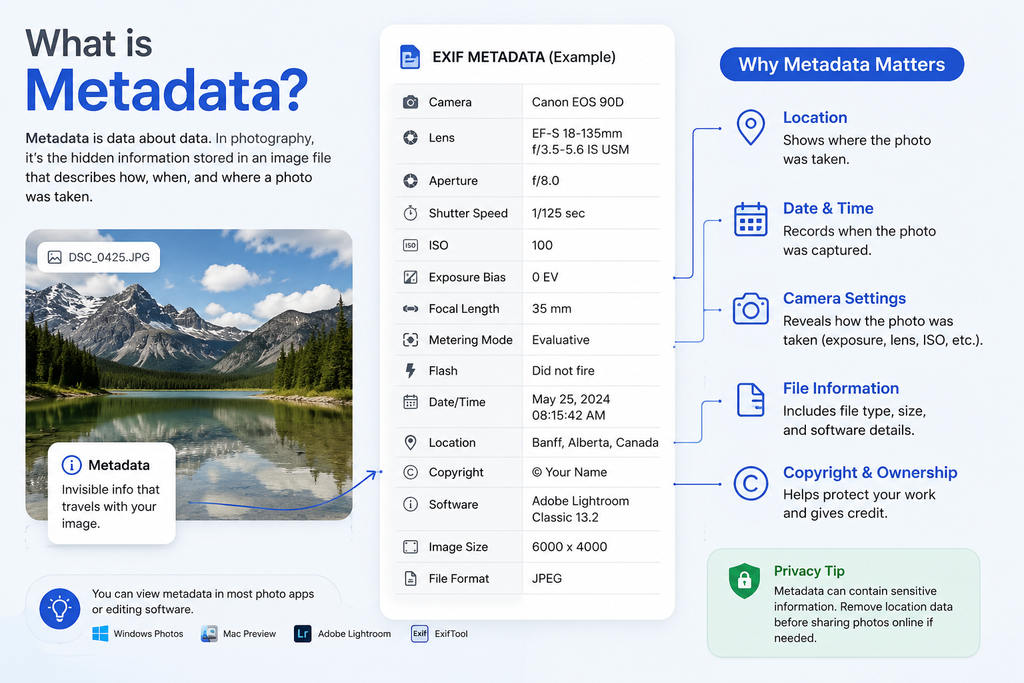
Digital photographs may contain EXIF metadata.
Metadata can include technical information such as camera model, image dimensions, exposure settings, creation dates, and sometimes location information.
However, metadata must be treated carefully.
Many websites and messaging platforms remove metadata when an image is uploaded or compressed. Metadata can also be changed. A timestamp inside EXIF data therefore should not automatically be treated as proof of when or where an image was taken.
Metadata works best as another supporting clue.
For serious verification, compare it with visual evidence, publication records, reverse search results, and trustworthy sources.
How to Search Cropped, Blurry, or Edited Images
Low quality images are harder to search because important visual information has been removed.
Start by searching the original version if you have it.
If you only have a screenshot, remove unnecessary interface elements such as large borders or blank areas. Keep the main subject at a reasonable size.
Try several crops rather than one.
For example, one search can use the complete photograph. Another can focus on the product. A third can focus on a logo or landmark.
Avoid excessive enhancement.
Artificial sharpening, face reconstruction, or AI generated details can create information that was never present in the original photograph. That can actually make reverse search less reliable.
A cleaner crop is often more useful than aggressive enhancement.
Image Search for Verification and Fact Checking
Image search becomes particularly valuable when photographs spread through social media without context.
A picture may be real while its caption is false.
For example, an old photograph from one country might be reposted and described as a new event somewhere else. Reverse searching the image can reveal older appearances and expose the incorrect context.
TinEye’s date information can help with this kind of investigation, provided researchers remember that its first found date represents when TinEye indexed the image rather than the true original publication date.
You should therefore examine several pieces of evidence.
Check older webpages, credible news reports, photographer credits, captions, dates, geographic details, and other copies of the image before reaching a conclusion.
A single reverse search result is evidence. It is not always proof.
How Does NSFW Filtering Affect Image Search?
NSFW usually means “Not Safe for Work.” The term commonly refers to sexually explicit, nude, graphic, or otherwise sensitive visual content.
Search engines use content classification systems to identify some of this material. These systems help provide safer search experiences and reduce accidental exposure to explicit images.
Google’s SafeSearch, for example, currently provides Filter, Blur, and Off settings. Filter attempts to block explicit results, while Blur obscures explicit images that its systems detect. Google notes that SafeSearch applies to Google Search rather than every website or search engine on the internet.
NSFW filtering matters in image research because it can change the results you see. Researchers, content moderators, publishers, schools, and families may intentionally use stronger filtering.
Automated classification is not perfect. A medical image, artwork, swimwear photograph, or other legitimate content may occasionally be classified incorrectly. Explicit material may also escape a filter.
Sensitive images should be handled with added care. Avoid uploading private or intimate photographs to unknown services. Never use image searching to harass, expose private information, or distribute nonconsensual intimate material.
Pro Tips for Better Image Search Results
A strong search starts with the image itself, but successful investigations usually combine several signals.
Search both the complete image and cropped sections. Try more than one visual search provider. Extract visible text with OCR. Search distinctive phrases in quotation marks. Look for watermarks and usernames. Compare older and newer results. Examine the webpages where copies appear.
Also pay attention to image quality.
A higher resolution version may reveal text or details that disappear in a small screenshot. TinEye even provides a Biggest Image sorting option that can help users locate larger indexed versions of matching pictures.
Do not stop when you find the first plausible answer.
Search engines rank results according to their own systems. The highest result is not automatically the original source, copyright owner, photographer, or most accurate explanation.
Cross checking is what turns image searching into image verification.
Can AI Help With Image Searching?
AI can help before, during, and after a search.
An AI vision system can describe an image, read visible text, identify objects, suggest keywords, explain unfamiliar symbols, and point out details that might be worth searching separately.
ChatGPT, for example, supports image inputs and can interpret photographs and documents uploaded to a conversation. OpenAI also notes that image interpretation can make mistakes, particularly when pictures are unclear, text is difficult to read, or visual details are ambiguous.
ChatGPT can also search the web when web search is available.
However, image understanding and traditional reverse image indexing are not the same technology.
A dedicated service such as TinEye maintains an index specifically designed to compare image fingerprints. ChatGPT is better viewed as a tool for understanding an image, extracting clues, developing search queries, and researching those clues, rather than a direct replacement for every dedicated reverse image search engine.
Privacy and Ethical Image Searching
Image search is powerful, so privacy matters.
Do not assume that because an image exists online, every use of it is appropriate. Photographs can contain children, private individuals, addresses, identification documents, medical information, or other sensitive details.
Think carefully before uploading sensitive photographs to third party services.
Privacy practices also vary between providers. TinEye, for example, states that uploaded search images are not added to its index and are kept only briefly for processing and displaying results.
Users should check the current privacy terms of any service before submitting confidential material.
Image searching should be used for legitimate research, verification, copyright investigation, product discovery, education, and similar purposes rather than stalking, harassment, doxxing, or invasion of privacy.
Final Thoughts
Effective image search techniques go far beyond typing keywords into Google Images.
Reverse image search can locate matching copies. Visual recognition can identify products and objects. OCR can turn signs and screenshots into searchable text. Metadata may provide supporting clues. Cropping can reveal details that a full image hides.
The most reliable method combines these approaches.
Start with Google Lens for broad visual discovery. Check TinEye when you need exact or edited copies. Run the picture through Bing Visual Search for another set of results. Extract any visible text through OCR and search it separately.
Most importantly, verify what you find.
A matching image does not automatically prove who created it, when it was first published, who appears in it, or whether the surrounding story is true. Strong image research comes from combining visual evidence with trustworthy webpages, dates, text, and context.
FAQ’s
How to find a person by photo?
A reverse image search can sometimes locate webpages where the same publicly available photograph appears. Try the full image in Google Lens, Bing Visual Search, or TinEye, then search useful clues such as a visible username, event name, organization, or caption. However, a visual match does not automatically prove a person’s identity. Respect privacy and avoid using image searching to track, expose, or harass private individuals.
Can ChatGPT reverse image search?
ChatGPT can analyze uploaded images and can search the web in supported experiences. It can help describe a picture, read text, identify objects, and develop search terms. However, it should not be treated as identical to a dedicated reverse image index such as TinEye. For exact web copies, a dedicated reverse image search engine may provide better direct matching.
What is the best search for an image?
It depends on your goal. Google Lens is a strong general choice for identifying objects and finding related webpages or images. Bing Visual Search provides a useful alternative. TinEye is particularly useful for finding exact or modified copies and tracing where matching images have been indexed.
Can OCR help with reverse image search?
Yes. OCR can extract text from signs, screenshots, documents, labels, usernames, and other parts of an image. You can then search that text normally. This is especially useful when traditional reverse image search produces weak results.
Can reverse image search find the original source?
Sometimes, but not always. An older indexed result can provide an important clue, but it does not necessarily represent the first publication. Search engine indexes are incomplete, webpages disappear, and images are frequently copied without attribution. The best approach is to compare dates, source pages, captions, credits, and several search engines before deciding which source is likely to be original.


Susan Cross Toby Stephens’ Sister, Family, and Public Record

William Richards: The Father Michael Richards Grew Up Believing He Had

Betty Blakemore Sulzbach: Life Of Leslie Bibb’s Mother

Cathy Howe: Gordie Howe’s Daughter, Family, and Public Life

Lois Retton: The Story of Mary Lou Retton’s Mother
